
The way professionals build presentations changed faster in the last two years than in the previous two decades. AI presentation makers now turn a prompt, a document, or a link into a finished, designed deck in about a minute. Among the tools leading this shift, Smallppt has earned a reputation as one of the most complete and accessible options on the market. This in-depth guide explains what Smallppt is, what it can do, how much it costs, where it shines and where it falls short, what real users say, why it has become one of 2026's fastest-growing AI slide makers, and how it compares with the slide-making solutions from Manus and Kimi.

- Smallppt is an AI presentation maker that turns text, documents, links, or audio into polished slides in about a minute
- It bundles a full suite—AI PPT maker, writer, summarizer, chat, mind map, and PDF tools—into one workspace
- Its mix of a generous free plan, fast output, and versatile inputs has driven rapid adoption in 2026
- Versus Manus and Kimi, Smallppt stands out for speed, value, and all-in-one convenience for everyday decks
What Is Smallppt?
Smallppt is an AI-powered presentation maker that transforms your ideas, documents, and web links into structured, visually consistent slides in minutes. Instead of opening a blank file and building every slide by hand, you give Smallppt a starting point—a topic, an outline, a file, a URL, or even an audio recording—and its AI drafts the content, organizes it into a logical flow, and applies a clean, auto-designed layout. You then refine the result through a simple online editor.
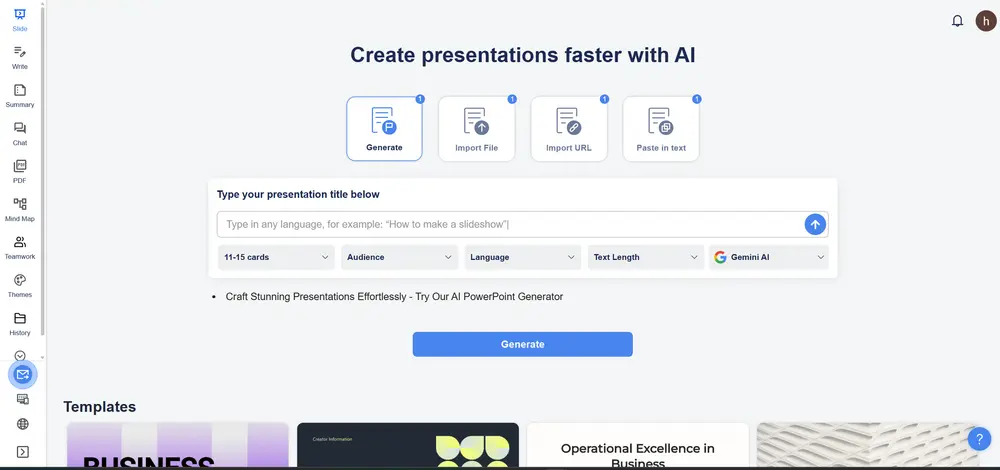
What sets Smallppt apart from a single-purpose generator is that it behaves more like a compact productivity suite. Alongside the core AI PPT maker, it offers an AI Writer, an AI Summarizer, an AI Chat assistant, an AI Mind Map tool, and AI PDF utilities. That means the same platform can help you research a topic, summarize a long report, outline your thinking, generate the slides, and tidy up related documents—without forcing you to jump between five different apps. For marketers, sales teams, educators, consultants, founders, and students, that integrated workflow is a meaningful time-saver.
What Can Smallppt Do? Key Features
Smallppt's feature set is built around one goal: getting you from raw input to a presentable deck as quickly as possible. The table below summarizes what it offers.
| Feature | What it does |
|---|---|
| Multi-format input | Generate slides from text, a file, a URL, or an audio recording |
| One-minute generation | Produces a complete first-draft deck in roughly a minute |
| Smart auto-layouts | Automatically arranges content into clean, consistent slides |
| Template library | A large library of templates to match tone and audience |
| Real-time editing | Online editor with collaboration, sharing, and commenting |
| AI Writer & Summarizer | Drafts copy and condenses long documents into key points |
| AI Mind Map & Chat | Helps brainstorm and structure ideas before slide creation |
| AI PDF tools | Edit and convert PDFs that feed into your presentation workflow |
The multi-format input is arguably the most underrated strength. Real work rarely starts from a clean prompt—it starts from a document your manager sent, a web article, a rough outline, or a meeting recording. Because Smallppt can ingest all of these, it removes friction before you ever touch the design. Combined with smart layouts that handle spacing and hierarchy automatically, the tool lets non-designers produce clean, readable decks with very little effort.
Smallppt Pricing
Smallppt follows a freemium model. There is a free Basic plan that lets you explore the core features—including AI slide generation—without a credit card, which makes it easy to try before you commit. Paid Pro and team plans then unlock higher usage limits, premium templates, advanced export options, and collaboration features for groups. Billing is handled through major credit and debit cards as well as PayPal and other processors, and plans can be upgraded or canceled at any time.
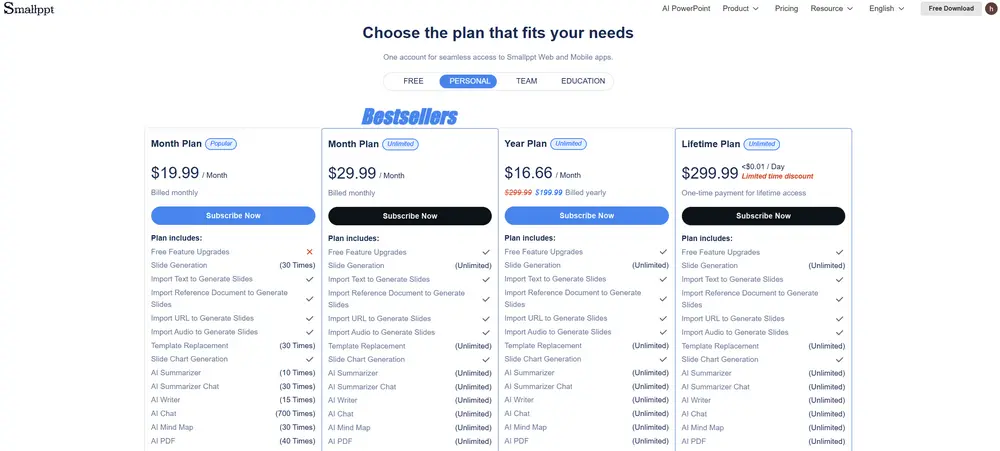
Because pricing tiers and exact figures can change, you should confirm the current numbers on the official Smallppt pricing page before budgeting. In general, though, reviewers consistently describe Smallppt as offering strong value: a functional free tier plus competitively priced paid plans make it more accessible for individuals and small teams than several rivals that charge premium per-seat rates with no free option at all.
Strengths and Shortcomings
No tool is perfect, and an honest look at both sides helps you decide whether Smallppt fits your workflow. Here is the balanced picture drawn from its feature set and independent reviews.
Strengths
- Generates slides from text, files, URLs, or audio
- All-in-one suite: PPT maker, writer, summarizer, chat, mind map, PDF
- Generous free plan and competitive paid pricing
- Fast, around-a-minute generation with smart auto-layouts
- Real-time online editing and team collaboration
Shortcomings
- Output quality depends on the source material
- Very complex formatting may be simplified
- Generated content still needs a human review pass
- High-stakes decks require extra manual polish
What Users Say
Across independent reviews and user feedback, a few themes come up again and again. The most common is time saved: people describe tasks that once took hours being finished in a fraction of the time, with one reviewer noting that work that used to take hours now takes around half an hour. Educators in particular highlight how quickly Smallppt turns lesson material into professional-looking slides, freeing them to focus on teaching rather than formatting.
Reviewers also praise the integrated suite. Because the PPT maker sits alongside writing, summarizing, mind-mapping, and PDF tools, users can move through the whole creative process inside one ecosystem instead of stitching together several apps. The versatility of input—text, files, URLs, and audio—is frequently called a genuine competitive advantage, turning the product from a simple generator into a content-repurposing engine. The most common caveat is the same one that applies to every AI tool: for high-stakes, client-facing decks, users still recommend a final polish pass to tighten wording, refine charts, and strengthen the narrative.
Why Smallppt Is One of 2026's Fastest-Growing AI Slide Makers
The AI presentation category is crowded, yet Smallppt has carved out rapid momentum in 2026. The reasons are practical rather than hype. First, it lowers the barrier to entry: a capable free plan means anyone can produce a real deck without paying, which fuels word-of-mouth adoption among students, teachers, and small teams. Second, it meets people where their content already lives—by accepting documents, links, and audio, it fits naturally into messy, real-world workflows instead of demanding a clean prompt.
Third, the all-in-one suite increases stickiness. Once a user relies on Smallppt for writing, summarizing, and mind-mapping as well as slides, switching away becomes far less appealing. Fourth, the tool has kept pace with the underlying AI models powering generation, which keeps output quality competitive. And fifth, its value positioning—strong features at accessible prices—lands well in a market where several established rivals charge premium rates with no free tier. Taken together, these factors explain why Smallppt's user base has expanded so quickly: it removes cost, friction, and tool-switching all at once. For teams evaluating where the category is heading, that combination is exactly what is drawing new users in.
Smallppt vs. Manus vs. Kimi: Slide-Making Solutions Compared
Smallppt, Manus, and Kimi all generate slides with AI, but they take noticeably different approaches. Manus is a general-purpose AI agent whose Slides feature researches a topic across the live web before building a deck, complete with speaker notes and custom visuals—powerful for research-heavy business and enterprise decks, though it runs on a credit model and trades speed for depth. Kimi Slides, built inside Moonshot AI's Kimi+ ecosystem, is a strong free option that offers a fast "Visual" mode and a deeper research "Adaptive" mode; it produces polished first drafts but, as of 2026, lacks custom brand templates and was built primarily for Chinese-language workflows. Smallppt, by contrast, focuses on speed, versatility of input, and an integrated everyday workflow. The table below lays out the differences.
| Smallppt | Manus | Kimi | |
|---|---|---|---|
| Core approach | Multi-input AI maker plus a productivity suite | Autonomous agent that researches, then builds | Slide agent inside the Kimi+ ecosystem |
| Best for | Fast everyday decks, educators, small teams | Research-heavy business and enterprise decks | Free first drafts and deep-research decks |
| Speed | About a minute | Slower; depth over speed | 5–10 min (Visual); 30–60 min (Adaptive) |
| Free option | Free Basic plan | 300 free credits, then credit-based | Free for core generation |
| Standout extra | Writer, summarizer, mind map, PDF tools | Live web research and speaker notes | Strong visuals and deep-research mode |
| Watch-outs | Polish needed for high-stakes decks | Credit cost; less suited to quick decks | No custom brand templates yet; Chinese-first |
The takeaway is that the right choice depends on the job. If you need a deep, research-backed enterprise deck and do not mind a credit system, Manus is compelling. If you want a capable free generator and are comfortable adding final polish elsewhere, Kimi is excellent value. But if your priority is speed, flexible inputs, and an all-in-one workspace that handles the whole content-to-slides journey for everyday presentations, Smallppt is the most practical fit—which is a large part of why it keeps winning new users.
Whichever tool you choose, treat the AI output as a strong first draft, not the final product. A quick human review of facts, tone, and key visuals is what turns a generated deck into a presentation you can trust on stage.
Conclusion
Smallppt has become one of 2026's standout AI slide makers by getting the fundamentals right: it accepts the messy inputs people actually work with, generates a clean deck in about a minute, and surrounds the slide maker with a genuinely useful suite of writing, summarizing, mind-mapping, and PDF tools. Its generous free plan and competitive pricing lower the barrier to entry, which helps explain its rapid growth. Against Manus, with its research-first agent, and Kimi, with its strong free deep-research mode, Smallppt wins on speed, versatility, and everyday convenience. For anyone who builds presentations regularly and wants to spend less time formatting and more time on their message, Smallppt is well worth trying—starting with its free plan today.
FAQs
What is Smallppt used for?
Smallppt creates presentation slides from text, documents, links, or audio using AI, and adds writing, summarizing, mind-mapping, and PDF tools in one workspace.
Is Smallppt free?
Yes, Smallppt has a free Basic plan that covers core features, with paid Pro and team plans for higher limits and advanced options. Check the pricing page for current details.
How is Smallppt different from Manus and Kimi?
Manus is a research-first AI agent and Kimi is a strong free generator inside the Kimi+ suite. Smallppt focuses on speed, flexible inputs, and an all-in-one everyday workflow.
Do I still need to edit AI-generated slides?
Yes. The AI produces a strong first draft, but a quick human review of facts, tone, and visuals is recommended before presenting, especially for high-stakes decks.