
Whether you're writing chemical formulas (H₂O), mathematical expressions (x²), footnote markers, or trademark symbols (™), you need superscripts and subscripts in your slides. This guide shows you exactly how to do it in both PowerPoint and Google Slides, including keyboard shortcuts.

- PowerPoint shortcut: Ctrl+Shift+= (superscript) and Ctrl+= (subscript). Press again to toggle off.
- Google Slides shortcut: Ctrl+. (superscript) and Ctrl+, (subscript).
- Below: step-by-step for both tools, plus a full shortcut reference table.
How to Superscript in PowerPoint
- Select the text you want to make superscript.
- Press Ctrl+Shift+= (Windows) or Cmd+Shift+= (Mac).
- The selected text moves up and shrinks — superscript applied.
- To remove: select the superscript text and press the same shortcut again.
Alternative method (menu):
- Select the text.
- Click Home → click the small arrow in the Font group to open the Font dialog box.
- Check Superscript → click OK.
How to Add Subscript in PowerPoint
- Select the text you want to make subscript.
- Press Ctrl+= (Windows) or Cmd+= (Mac).
- The selected text moves down and shrinks — subscript applied.
- To remove: select the subscript text and press the same shortcut again.
Alternative method: Home → Font dialog box → check Subscript → OK.
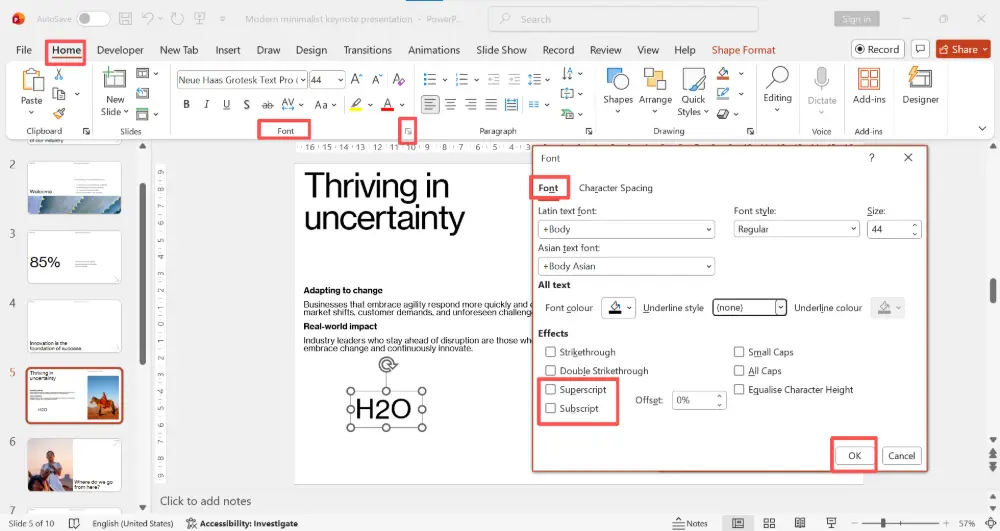
In PowerPoint, you can also adjust the offset percentage in the Font dialog box — this controls how far above or below the baseline the text sits. The default is 30% for superscript and -25% for subscript. Adjust if the positioning doesn't look right.
Superscript in Google Slides
- Select the text you want to make superscript.
- Press Ctrl+. (period) on Windows or Cmd+. on Mac.
- The text becomes superscript.
- To remove: select the text and press the same shortcut again.
Alternative method:
- Select the text.
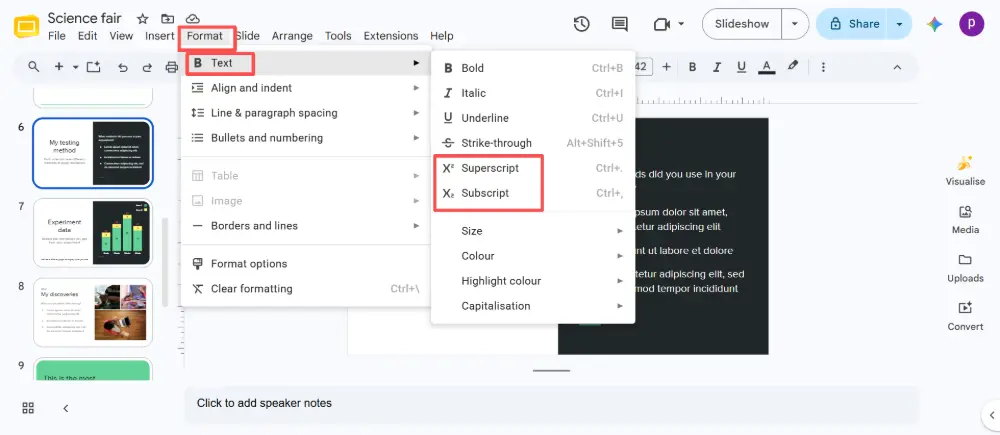
- Click Format → Text → Superscript.
Subscript in Google Slides
- Select the text you want to make subscript.
- Press Ctrl+, (comma) on Windows or Cmd+, on Mac.
- The text becomes subscript.
- To remove: select the text and press the same shortcut again.
Alternative method: Format → Text → Subscript.
All Shortcuts at a Glance
| Action | PowerPoint (Windows) | PowerPoint (Mac) | Google Slides |
|---|---|---|---|
| Superscript | Ctrl+Shift+= | Cmd+Shift+= | Ctrl+. (period) |
| Subscript | Ctrl+= | Cmd+= | Ctrl+, (comma) |
| Remove | Same shortcut again | Same shortcut again | Same shortcut again |
| Menu method | Home → Font → Superscript/Subscript | Home → Font → Superscript/Subscript | Format → Text → Superscript/Subscript |
Common Uses for Superscript and Subscript
| Type | Common uses | Examples |
|---|---|---|
| Superscript | Exponents, ordinals, footnotes, trademark/copyright | x², 1st, 2nd, 3rd, footnote¹, ™, ©, ® |
| Subscript | Chemical formulas, mathematical notation, variable indices | H₂O, CO₂, O₂, a₁, x₀ |
💡 Pro tip: If you're building science or math presentations frequently, try Gamma.com.ai — describe your content and the AI generates designed slides that handle formatting automatically, so you spend less time on manual text styling.
Conclusion
Superscript and subscript in PowerPoint: Ctrl+Shift+= and Ctrl+=. In Google Slides: Ctrl+. and Ctrl+,. Both tools also offer menu-based options (Font dialog in PowerPoint, Format → Text in Google Slides). The shortcuts are toggle-based — press once to apply, press again to remove. Memorize the two shortcuts for your tool of choice and you'll never need to hunt for the option again.
FAQs
What is the shortcut for superscript in PowerPoint?
Ctrl+Shift+= on Windows, Cmd+Shift+= on Mac. Select the text first, press the shortcut, and it toggles superscript on. Press again to remove it.
What is the subscript shortcut in PowerPoint?
Ctrl+= on Windows, Cmd+= on Mac. Select the text, press the shortcut. Press again to toggle it off.
How do I do superscript in Google Slides?
Select the text → press Ctrl+. (period) on Windows or Cmd+. on Mac. Or go to Format → Text → Superscript. The same shortcut toggles it off.
How do I type subscript in Google Slides?
Select the text → press Ctrl+, (comma) on Windows or Cmd+, on Mac. Or go to Format → Text → Subscript.
Can I use superscript and subscript together?
Not on the same character — a character can only be one or the other (or neither). But you can have superscript and subscript on different characters in the same text box, like in chemical formulas with exponents.