
You've found the perfect image inside a Google Slides presentation — or you need to export a slide as an image file. Either way, Google Slides doesn't make it obvious how to do it. This guide covers how to save an image from Google Slides, how to download a Google Slide as an image, how to make a copy of an entire slideshow, and why saving images from Google Search sometimes doesn't work.

- To save an image from a slide: right-click the image → "Save to Keep" (then download from Google Keep), or use the Google Slides → Google Docs workaround.
- To download a slide as an image: File → Download → JPEG or PNG.
- Below: step-by-step instructions for every method, plus how to copy an entire slideshow and why Google Images sometimes blocks downloads.
How to Save an Image from Google Slides
Google Slides doesn't have a simple "Save Image As" option when you right-click a picture. Here are the workarounds:
Method 1: Google Keep (fastest)
- Right-click the image in your slide.
- Click "Save to Keep" (this sends the image to Google Keep as a note).
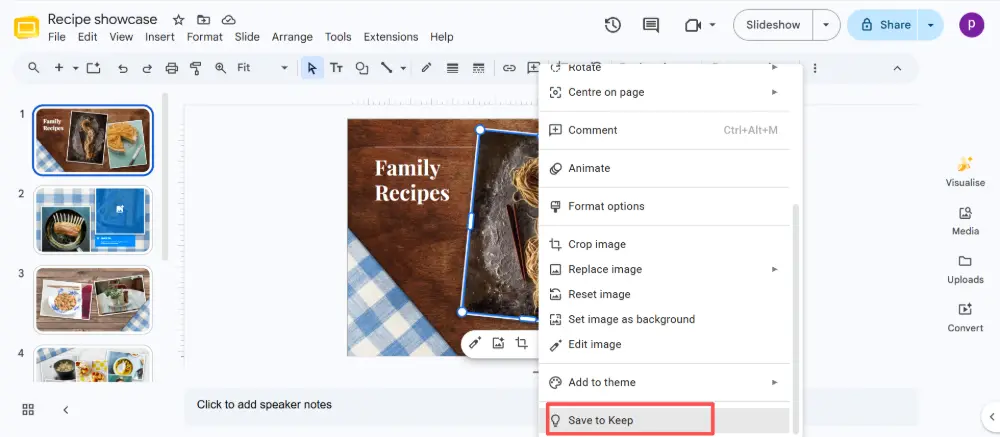
- A Keep panel opens on the right side.
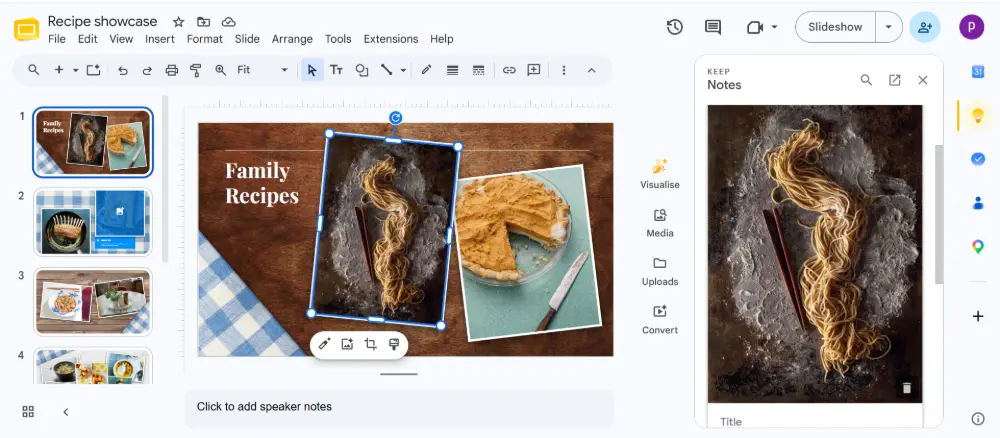
- Right-click the image in Keep → "Save image as" → save to your computer.
Method 2: Google Docs workaround (all images at once)
- In Google Slides, click File → Download → Microsoft PowerPoint (.pptx).
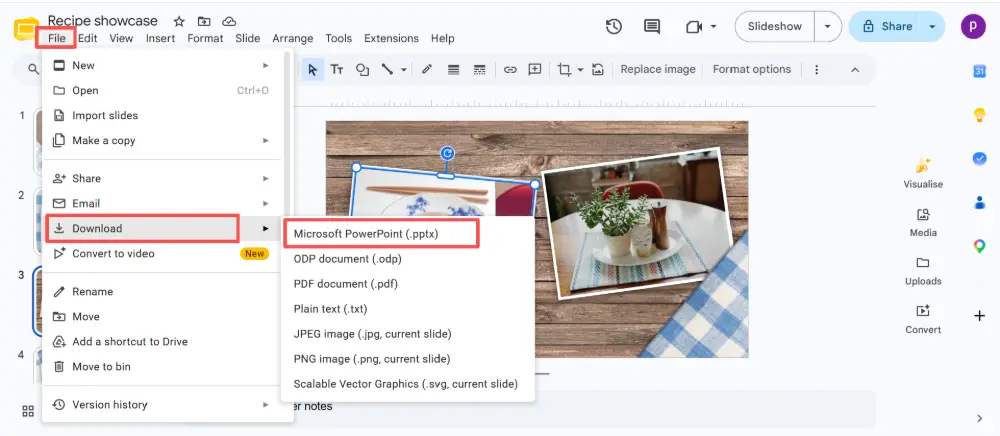
- Rename the downloaded .pptx file to .zip (change the file extension).
- Unzip the file.
- Open the folder: ppt → media. All images from the presentation are saved here as individual files.
This method extracts every image from the entire presentation at once — useful when you need multiple images.
Method 3: Copy and paste into a drawing tool
- Click the image in Google Slides.
- Press Ctrl+C (Cmd+C on Mac) to copy.
- Open a drawing tool (Google Drawings, Paint, or any image editor).
- Press Ctrl+V to paste.
- Save or export the image from there.
The .pptx → .zip method (Method 2) gives you the highest quality images because they're extracted at their original resolution — no compression from copy-pasting.

How to Download a Google Slide as an Image
To save a slide as an image (the entire slide, not just a picture on it):
- Go to the slide you want to export.
- Click File → Download.
- Choose JPEG image (.jpg) or PNG image (.png).
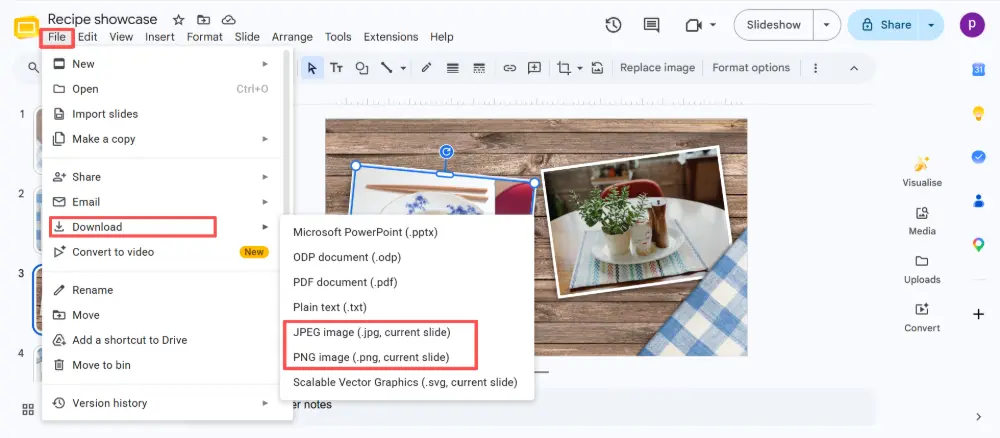
- The current slide downloads as an image file.
This exports only the currently selected slide. To download all slides as images, you'll need to select each one individually and repeat, or download as PDF and convert the pages to images.
How to Download a Google Slides Presentation
To download the entire presentation as a file:
- Click File → Download.
- Choose your format: PowerPoint (.pptx), PDF, JPEG, PNG, or other options.
- The file downloads to your computer.

How to Make a Copy of a Google Slideshow
To make a copy of an entire Google Slides presentation (within Google Drive):
- Open the presentation.
- Click File → Make a copy.
- Choose "Entire presentation" or "Selected slides".
- Name the copy and choose where to save it in Google Drive.
- Click Make a copy.
The copy is independent — changes to the original don't affect it, and vice versa.
Download Methods Compared
| What you want | How to do it |
|---|---|
| Save one image from a slide | Right-click → Save to Keep → download from Keep. Or copy-paste into an image editor. |
| Save all images from a deck | Download as .pptx → rename to .zip → unzip → find images in ppt/media folder. |
| Export one slide as an image | Go to the slide → File → Download → JPEG or PNG. |
| Download the full presentation | File → Download → choose format (.pptx, PDF, etc.). |
| Make a copy of the slideshow | File → Make a copy → Entire presentation. |
Why Can't I Save Google Images?
If you're trying to save an image from Google search (not Google Slides) and it won't work, here's why:
- Right-click is disabled: some websites block right-click to prevent image downloads. Workaround: open the image in a new tab (right-click → "Open image in new tab"), then save from there.
- The image is embedded in a script: some sites load images via JavaScript, which prevents direct saving. Try taking a screenshot instead.
- WebP format: Google often serves images in WebP format, which some older software doesn't recognize. Save the WebP file and convert it to PNG or JPEG using a free online converter.
- Copyright protection: some image sites use protection to prevent downloading. If you need the image, check if it's available on a stock photo site or under a Creative Commons license.
💡 Pro tip: If you're building presentations and want to export them easily — as images, PDFs, or shareable links — AI tools like Gamma.com.ai let you create, share by link, and export in any format with one click, without the workarounds Google Slides requires.
Conclusion
Saving images from Google Slides requires a workaround since there's no direct "Save Image As" option: use Save to Keep, the .pptx-to-.zip extraction, or copy-paste into an editor. To download a slide as an image, use File → Download → JPEG/PNG. To make a copy of a slideshow, use File → Make a copy. And if Google Images won't let you save a picture, try opening it in a new tab, checking the format, or looking for an alternative source.
FAQs
How do I save an image from Google Slides?
Right-click the image → Save to Keep → then right-click the image in the Keep panel → Save image as. Alternatively, download the deck as .pptx, rename to .zip, unzip, and find all images in the ppt/media folder.
How do I download a slide as an image?
Go to the slide, click File → Download → JPEG or PNG. This exports the current slide as an image file. To export all slides, repeat for each one or download as PDF and convert pages to images.
How do I make a copy of a Google slideshow?
Open the presentation → File → Make a copy → Entire presentation. Name the copy and choose a location in Google Drive. The copy is fully independent from the original.
Why can't I save images from Google?
Common reasons: the website blocks right-click, the image is loaded via JavaScript, it's in WebP format (which some software doesn't handle), or it's copyright-protected. Try opening the image in a new tab, or take a screenshot as a workaround.
How do I download all images from a Google Slides deck?
Download the presentation as .pptx (File → Download → PowerPoint). Rename the .pptx file to .zip and unzip it. All images are in the ppt/media folder at their original resolution.